
Animation
- Animated Films Technical Specifications
- Setting Up a New Premiere Project
- Setting Up a New After Effects Composition
- Exporting a ProRes 422 HQ .mov from Premiere Pro
- Exporting from Premiere Pro for the Internet
- HD Aspect Ratios
- About Subtitles
- The Film/Video Render Farm
- Using an iPad with Apple Sidecar
Computer Labs
- Your FV Computer Account
- Connecting to FVCentral
- Creating an Email Filter in Gmail
- Recommended Minimum Computer Specifications for New Students 2025-2026
- Required Personal Equipment for Students
- Software Available in School of Film/Video Computer Labs
- Using the Computer Lab A/V Racks
- Software Launching Issues on FV Lab Computers
Equipment
FV Screenings
FVSound
- About Your Layback
- Burning a Blu-ray in Toast Titanium or Compressor
- F104 Quickstart Guide: Operating and Recording
- Layback in DaVinci Resolve
- Loading MixPre-3 and MixPre-6 Presets
- Pro Tools FV Templates to Download
- Recording Foley at Home
- Sound Devices MixPre Quickstart
- Getting Started with Soundly
- Using Standard Leader
- Using the Sennheiser MKH 418S Stereo Mic with the MixPres
- Working with the Pro Tools FV Edit Template
- Syncing Audio and Picture in Premiere Pro
- Auto Syncing Audio and Picture in DaVinci Resolve
- Using the AMBEO Ambisonics Mic with the MixPre 6 and Pro Tools Templates
- Using Local F/V Sound Effects
- Show all articles ( 1 ) Collapse Articles
Post Production
Production and Installation
Bijou Festival Technical Specifications
Last Updated:
< Back
These are the technical specifications for delivery for films playing in the Bijou Festival!
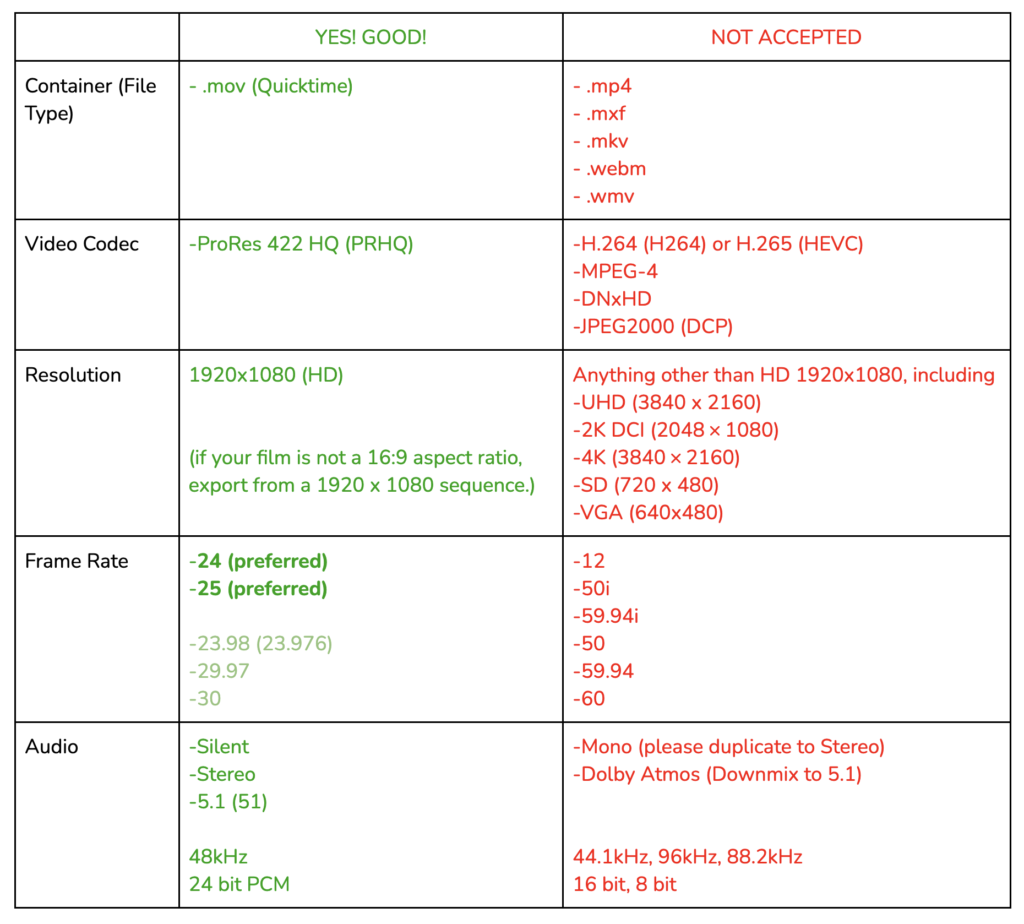
If your film does not meet these specifications, it cannot be played in the Bijou Theatre.
Instructions on how to submit a film for the Bijou Festival can be found HERE.
Additionally, here are detailed instructions on how to export your film correctly
Exporting from Premiere Pro | Exporting from After Effects | Exporting from DaVinci
Table of Contents